







Contactless Switch Keyboards Gain Popularity
A new wave of keyboards featuring "contactless switches has been gaining popularity in recent years, often at a higher price point than traditional mechanical keyboards.
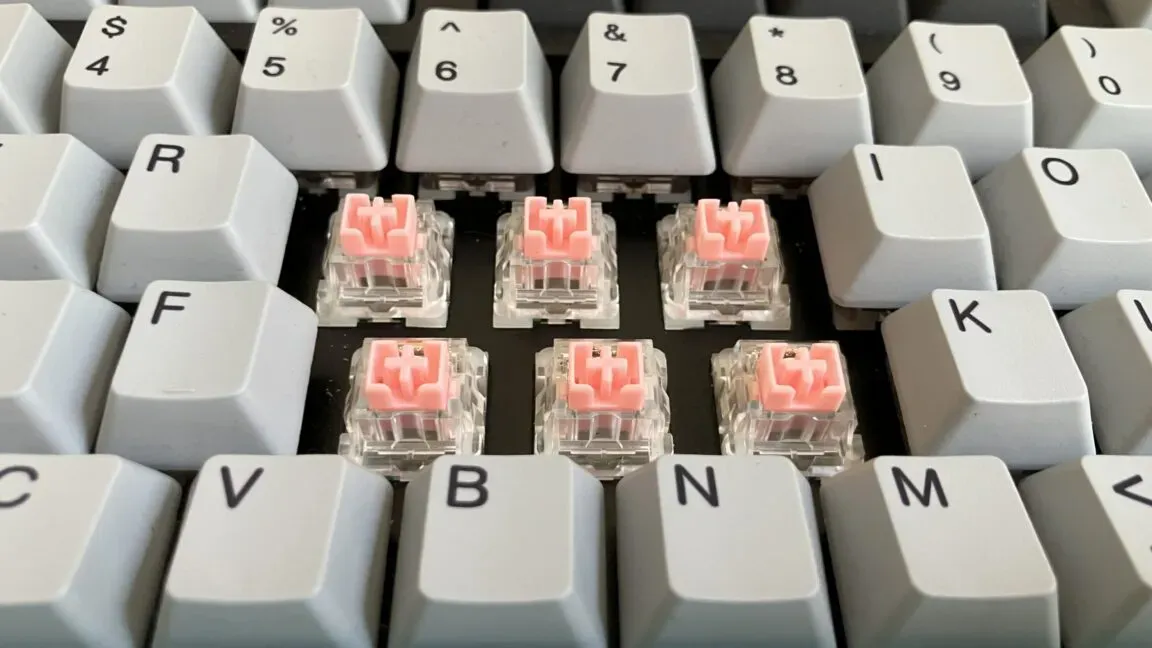
A new wave of keyboards featuring "contactless switches has been gaining popularity in recent years, often at a higher price point than traditional mechanical keyboards.
These keyboards promise several theoretical advantages, particularly for gamers, but the differences between them and traditional mechanical keyboards can be subtle in daily use.
The latest switch designs include optical, Hall-effect, and other types of mechanical switches that have been gaining traction in the market.
To understand what these new switches offer, it's essential to know how traditional mechanical switches work. They rely on physical contact between internal components, which can degrade over time.
A standard mechanical switch consists of two metal leaves, known as a crosspoint, shaped differently and connected by a spring. When pressed, the leaves touch and close a circuit on the keyboard's PCB, sending a signal to the microcontroller.
When a traditional mechanical switch is at rest, a protruding piece of the plastic stem keeps the switch's two leaves from making contact. As the stem moves downward, this piece allows the leaves to touch and complete the circuit.
The design of traditional switches has been around for decades, but their reliance on physical contact means they can wear out over time, leading to issues with consistency and reliability in key presses.
Contactless switches offer several advantages over traditional mechanical ones, including longer lifespan and resistance to oxidation and corrosion. This is because they don't rely on physical contact between metal leaves to register input, making them less prone to wear and tear.
However, there are some caveats to consider when it comes to the longevity of contactless switches. For one thing, they require specific printed circuit boards (PCBs) that are not as common as those used for standard mechanical switches. This can limit the options available for keyboard builders and manufacturers.
Additionally, while hot-swappability can extend a keyboard's lifespan by making it easier to replace broken keys or switch them out, finding PCBs and prebuilt keyboards that support contactless switches with hot-swapping capabilities is more challenging than it is for standard mechanical switches.
Newer standard mechanical switches have made significant strides in terms of lifespan, with some rated for 100 million keystrokes. If longevity is a top priority, contactless switches may still be worth considering, but users should compare their ratings to those of standard switches before making a decision.
Some enthusiasts and companies claim that contactless switches feel smoother when pressed due to the absence of metallic leaves touching. However, other components within the switch, such as springs and stems, can also contribute to friction, which may affect overall performance.
The smoothness of a switch is not solely determined by whether it operates mechanically or through alternative means like light beams or magnets. Instead, factors like specs, force curve, and materials play a more significant role in how a switch feels when pressed.
Many contactless switches offer customizable actuation points, which can be beneficial for users who want to tailor the feel of their keyboard. This feature allows for greater flexibility over how keys respond, including analog input options that may not be possible with traditional mechanical switches.
The accuracy of actuation points in contactless switches can be a concern when using software to customize settings. A recent test by RTINGs found that on 14 keyboards from 11 brands, the keys actually activated at different distances than what was set in the companion app. These discrepancies may seem minor, with differences measured in fractions of a millimeter.
Customization options for contactless switches go beyond adjustable actuation points. Some keyboards allow users to program keys to produce multiple inputs based on varying levels of press depth. For instance, a key could be set to register A" at 0.5 mm and "B at another 0.5 mm.
The potential for gamers is one reason why contactless switches are gaining popularity. These keyboards can also support analog input, which enables the detection of varying levels of switch press depth. This means that users can experience a joystick-like effect in their gaming setups.
Analog input allows the keyboard to adjust inputs based on how far a switch has been pressed, providing more nuanced control for gamers. Traditional mechanical keyboards lack this feature, relying instead on binary inputs that register as either pressed or not pressed.
Vendors often claim that contactless switches offer faster registration times than traditional mechanical keyboards. This is largely due to the absence of debouncing in these switches. Debouncing refers to the delay between a key press and when the keyboard accepts it as an input, necessary for standard switches to prevent misinterpreted inputs.
Debounce delays can be significant, ranging from 5 ms to 20 ms according to some estimates. However, manufacturers rarely disclose this information, leaving enthusiasts to rely on unofficial reports. Even Cherry's MX2A switches are said to require less than 1 ms for debouncing.
In some cases, keyboard manufacturers implement longer-than-necessary debounce times as a precaution against switch degradation over time. This can be seen as an unnecessary measure, given the potential benefits of more precise control offered by contactless switches.
The performance of a keyboard is influenced by several factors beyond just the sensing technology used in its switches. Key travel and actuation times are also crucial considerations, as well as the polling rate at which the keyboard communicates with a device.
For many users, these technical details may not be particularly relevant. It's primarily professional gamers who require ultra-low latency from their keyboards, assuming they've already optimized other areas such as their GPU, CPU, and monitor for reduced latency.
Contactless switches are often marketed towards gamers, which explains the prevalence of linear options in this category. Linear switches tend to offer a more consistent feel without any tactile bump or audible click.
The introduction of optical switches on consumer keyboards dates back to 2016. These switches rely on an infrared light beam to register key presses.
Optical switches operate by redirecting the IR light beam when the switch is pressed, causing it to hit or stop hitting a dedicated photoelectric sensor. This results in an input being registered, which is then transmitted to the device.
A closer look at Razer's optical switch reveals its internal components. The switch contains an IR emitter and sensor that are integrated into the keyboard's PCB, with the switch stem acting as the 'shutter' for the light path.
The design of Razer's optical switches has remained consistent across generations, with advancements in positioning, components, and firmware processing enabling features like adjustable actuation points and full travel-distance tracking.
These advancements have allowed manufacturers to refine their designs over time. In some cases, this has led to the development of more complex switch types, such as analog switches that offer a wider range of input possibilities.
The increased complexity of modern keyboard switches is not necessarily justified by the needs of most users. For those who don't require ultra-low latency or advanced features, simpler switch designs may be sufficient.
Optical switches are often touted as faster than traditional mechanical switches due to their lack of debouncing requirements. This is technically true, but it's unclear whether this speed difference would be noticeable in everyday use, such as typing an email.
While optical switches may offer some advantages over traditional switches, they don't necessarily translate to more flexible keyboard designs. Hot-swappable keyboards, for example, are relatively rare among optical keyboards, and users can't easily swap out optical switches in a hot-swappable keyboard designed for traditional mechanical switches.
Razer's spokesperson offered an explanation for the lack of hot-swappability in their optical keyboards. They argued that since optical switches don't degrade as quickly as traditional mechanical switches, users won't need to replace them over time. However, this reasoning focuses on longevity rather than customizability.
The design of Razer's optical keyboards is engineered as a fixed assembly to maintain the precise alignment required for consistent and accurate performance. This suggests that while optical switches may offer some benefits, they don't necessarily enable more flexible keyboard designs.
Electrostatic capacitive (EC) mechanical keyboards differ from traditional mechanical keyboards in their use of capacitance-sensing PCBs. However, these keyboards remain closely tied to the technology's origins and are still influenced by early innovations like IBM's Model F keyboard.
The Model F keyboard used a capacitive PCB with its famous buckling spring switches. When a buckling spring switch is depressed, it changes the capacitance between two capacitive pads beneath it, registering an input. This design has since been adapted in modern EC keyboards.
In today's EC keyboards, each switch typically features a conductive element that moves closer to a capacitive sensor pad on the PCB when pressed. This increased proximity changes the capacitance between the conductive element and the sensor pad, registering an input.
The design of EC switches can vary depending on the manufacturer and specific model. For instance, some keyboards use Model F switches, while others employ Topre keyboards or entirely different switch designs. Despite these variations, all modern EC keyboards rely on capacitance-sensing PCBs to register inputs.
While early innovations like IBM's Model F keyboard laid the groundwork for modern EC keyboards, today's designs continue to evolve and incorporate new features and technologies. As a result, users have a wider range of options when it comes to choosing an EC keyboard that suits their needs.
Topre keyboards have earned a reputation for their exceptional quality and distinctive sound profile. The thocky" thud they produce is a clean and soft sound that lacks the rattling or clacking often associated with other switch types.
These keyboards rely on electrostatic capacitive switches, such as the Type-S silent model, which feature remarkably smooth travel during key presses. This results in a predictable and intentional feel throughout the entire keystroke process.
Facts based on reporting originally published by Ars Technica.
You may republish this story, in full or in part, if you credit Noti Group and link to it (licence CC BY 4.0). Photos are not included.