




Apple Releases New MacBook Pros with Upgrades and Improvements
The new MacBook Pros feature a slimmer design, improved display, and added touchscreen functionality among other upgrades.
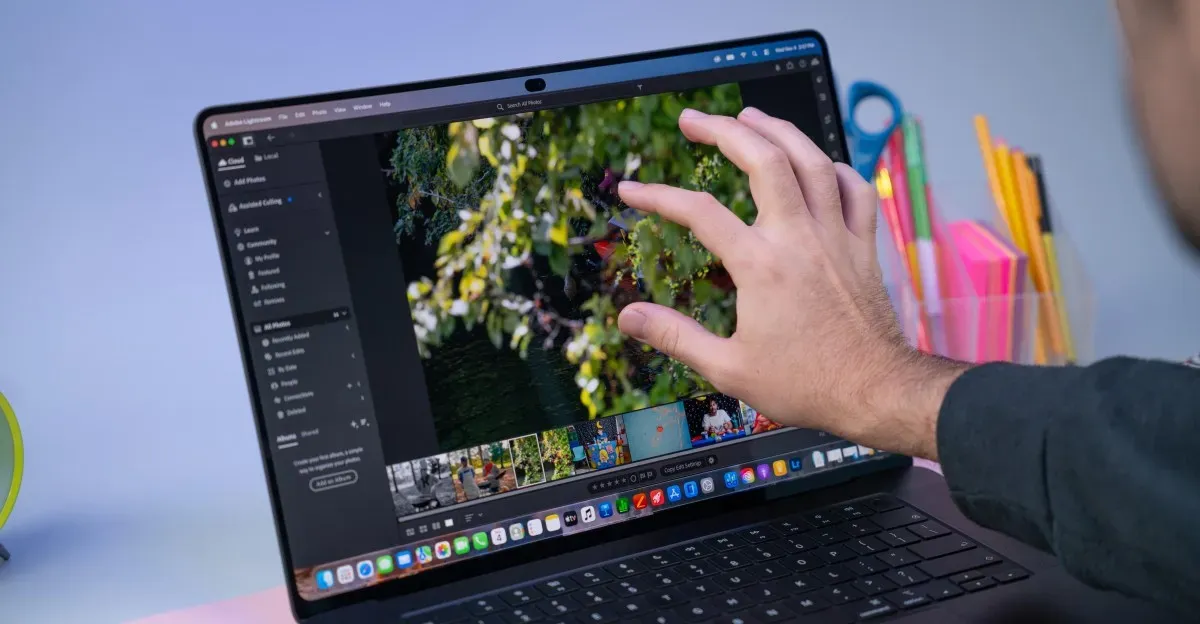
A new generation of MacBook Pros has been released, featuring a range of upgrades and improvements over previous models.
The latest iteration of Apple's most powerful laptop boasts a slimmer design and an improved display, making it a significant upgrade for users who value aesthetics and performance.
One notable feature that may have gone unnoticed by some is the addition of a touchscreen, allowing users to interact with their device in a more intuitive way.
However, upon closer inspection, it becomes clear that the touchscreen is not a game-changer, but rather an added convenience that enhances the overall user experience.
The new MacBook Pros come with a range of configurations and options, including different chip choices, RAM, and storage capacities.
For example, the 14-inch model starts at $2,899, while the 16-inch version begins at $3,399, both featuring either an M5 Pro or M5 Max chip.
The review unit provided was a 14-inch model with an M5 Pro chip that boasts impressive specs, including 18 CPU cores and 20 GPU cores, paired with 48GB of RAM and 1TB of storage.
Apple's decision to include a touchscreen on the MacBook Pros may have been driven by user demand, despite co-founder Steve Jobs' earlier skepticism about touch laptops.
The addition of the touchscreen has not fundamentally altered the laptop experience, but rather provided an alternative way for users to interact with their device.
The additional cost of this touchscreen MacBook Pro is around $400 compared to its standard counterpart, but I believe it's worth the extra expense, regardless of whether you opt for the touchscreen or not.
For those who want the ultimate laptop experience, Apple offers a fully loaded PROLED Pro with the M5 Max chip, nano-texture glass, 128GB of RAM, and 16TB of storage, priced at a staggering $14,549. It's an investment that requires serious financial commitment.
When I tested my middle-of-the-road PROLED configuration, its performance was impressive, benchmarking almost exactly in line with other devices equipped with the M5 Pro chip, such as the latest Mac Mini.
Understanding Apple's M-series chips is essential to appreciating their capabilities. Essentially, each new generation brings faster cores and additional cores, along with enhanced memory, making them more powerful than their predecessors.
In single-core, one-task benchmarks, the M5 Pro falls slightly behind some M6 devices, even those that are cheaper. However, when it comes to complex computing tasks, particularly those involving the GPU, the M5 Pro and Max chips outperform their competitors.
These laptops demonstrate exceptional speed in various tests, as we already knew from previous assessments. Moreover, they prove to be just as fast despite being housed in a smaller, thinner design, which is not always the case with such compact devices.
Apple has redesigned the thermal management system within these laptops to accommodate the new design and direct heat away from the OLED display, which can degrade or fail if exposed to excessive temperatures for an extended period. The fans are designed to activate before the laptop even reaches a moderate temperature, indicating a deliberate approach by Apple.
The new MacBook Pro boasts an exceptional display that far surpasses its predecessors. The screen's sharpness and contrast are noteworthy, allowing for both incredibly bright and dim settings. This level of flexibility makes it suitable for a wide range of applications, from gaming to video editing.
Visual professionals will particularly appreciate the laptop's ability to accurately render P3 and Adobe RGB color spaces. For those outside this field, however, the most noticeable improvement is likely to be the dramatic appearance of blacks in games and movies. In my experience, dark mode looks even more striking on this machine.
One trend that has emerged from Apple's recent product launches is the emphasis on thinner OLED displays. This design shift has several implications for the overall product. In addition to allowing for a sleeker aesthetic, it also enables smaller devices.
The PROLED Pro takes advantage of these advancements by sporting an impressively compact design. At 3 pounds, the 14-inch model weighs significantly less than its predecessors, bringing it closer in weight to the 15-inch MacBook Air. Despite this reduction in size, the device still feels substantial and dense.
However, one aspect that may not entirely meet expectations is the new speaker system. While the built-in speakers have always been impressive on Apple devices, I find the PROLED Pro's speakers to be overly bass-heavy and roomy. This results in a sound that feels like it's emanating from a large empty space.
Despite this minor drawback, the laptop's speakers remain among the best in their class. Most other laptops simply can't match the quality of sound produced by the MacBook Pro.
The rest of the hardware remains largely unchanged, with the same ports and features as before. The three Thunderbolt 5 ports, HDMI port, SD card slot, headphone jack, keyboard, trackpad, and battery life all remain identical to previous models.
The introduction of a touchscreen in the MacBook Pro lineup is a significant development that will likely become the standard for future models.
Apple's decision to reserve touch support for its top-of-the-line model is a strategic move, allowing developers to focus on optimizing their apps for this feature.
This approach also enables Apple to gauge user feedback and fine-tune its software before expanding touch functionality to other devices in the lineup.
The mental model for using the touchscreen on the MacBook Pro is straightforward: it emulates mouse clicks and trackpad gestures, making it easy for users to adapt.
In most instances, the touchscreen works seamlessly, but there are some exceptions. During gaming sessions, a few buttons may not respond to touch inputs.
This limitation can be frustrating, especially when trying to perform specific actions that require hovering or other complex interactions.
The lack of touch equivalents for certain actions, such as dismissing notifications or icons, is another area where the touchscreen falls short.
Apple has made some adjustments to macOS to accommodate touch functionality, but these changes are minimal and mostly focused on window management.
The touchscreen MacBook Pro's interface is designed to accommodate both touch and mouse interactions, but it's clear that macOS isn't optimized for touch as a primary navigational tool.
Users will likely find themselves moving their hands between the screen and palmrest frequently, which can be frustrating. This is because traditional mouse navigation feels more intuitive on a laptop, especially when performing tasks like editing documents or browsing the web.
Despite its limitations, the touchscreen MacBook Pro is still useful for certain tasks. For instance, users can tap on photos to zoom in on specific areas, making it easier to edit images.
This feature is particularly handy when working with large files or trying to pinpoint a specific detail within an image. The touchscreen also allows for more precise control over video playback, enabling users to tap on the screen to pause or resume watching.
When collaborating with others, the touchscreen MacBook Pro offers several benefits. For example, multiple users can swipe through options together, making it easier to share ideas and make edits in real-time.
The Dynamic Island feature, borrowed from other touch devices, is also useful on this laptop. Users can control music playback and access various settings without having to navigate menus or find specific tabs.
However, using the touchscreen as a primary input method still feels unnatural for most tasks. The Dynamic Island can be accessed by swiping down from it, but even this feature is easier to use with a mouse.
The touchscreen MacBook Pro's versatility shines when performing specific tasks that require touch-based interactions, such as photo editing or video playback.
The touchscreen MacBook Pro's versatility shines when performing specific tasks that require touch-based interactions, such as photo editing or video playback.
However, tapping on the screen only occasionally, for perhaps half a dozen times a day, is more in line with typical usage patterns for this device.
One can imagine using it like a touch-first device, but attempts to do so proved futile. There's no on-screen keyboard that appears when typing into a text box, and basic functions such as copy, paste, and select all are not accessible through tapping.
Tapping on the Dynamic Island allows control over music playback or notification access, and swiping from the edge reveals widgets - these are among the most touchscreen-native features of this computer. However, even in these instances, there's an underlying emphasis on mouse and keyboard interaction.
The design of the MacBook Pro suggests that it's not intended to be a laptop where touch is a primary input method. It seems more geared towards users who prefer a traditional typing experience with occasional touch interactions for specific tasks.
Facts based on reporting originally published by The Verge.
You may republish this story, in full or in part, if you credit Noti Group and link to it (licence CC BY 4.0). Photos are not included.