Noti.Group RSS Feed
  • Contact Us
Tuesday, March 17, 2026
Noti Group Logo
  • Home
  • World News
  • Business
  • Health
  • Sports
  • Entertainment
No Result
View All Result
  • Home
  • World News
  • Business
  • Health
  • Sports
  • Entertainment
No Result
View All Result
Noti Group
No Result
View All Result
ADVERTISEMENT

How to turn on Lockdown Mode for your iPhone and Mac

in Technology
Reading Time: 12 mins read
399 12
A A
0
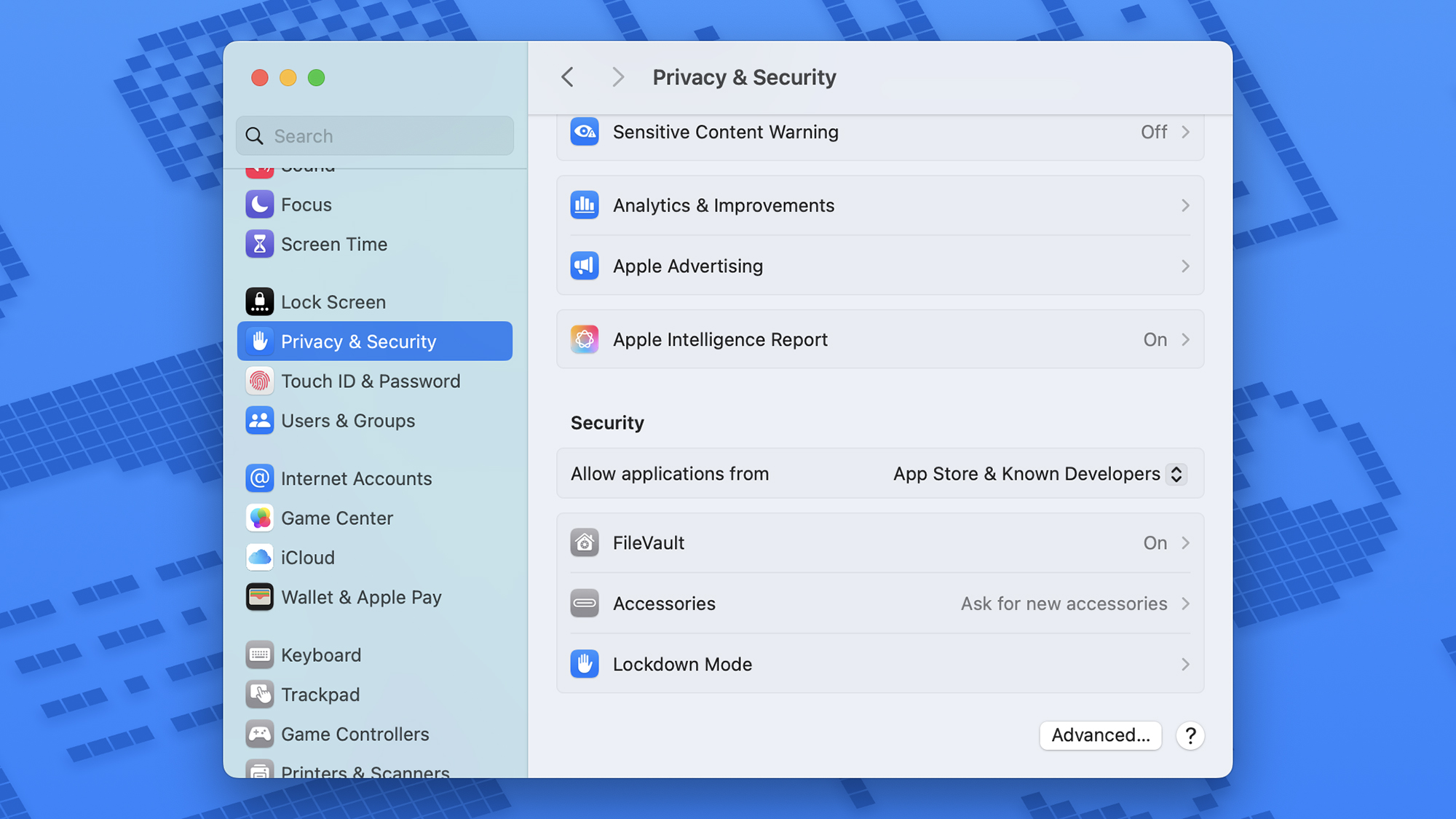
The Privacy & Security page on a Mac’s setup app, with Lockdown Mode at the bottom.
137
SHARES
6.8k
VIEWS
ShareShareShareShareShare

Apple is known for prioritizing privacy and security, but there are additional measures you can turn to if you feel you need them. iPhones, iPads, and Macs have what’s known as a Lockdown Mode that takes protecting your data to a whole new level.

It’s clear that this isn’t for everyone: Apple describes it as being for those who feel they might be attacked by “the most sophisticated threats.” Think journalists working in dangerous regions, activists under threat from surveillance or censorship, or politicians with access to top secret information.

Anyone can turn it on and off as needed — you don’t need any special status or any particular kind of Apple account. It only takes a few taps or clicks, and you’ll have the highest level of security protection that Apple offers.

How Lockdown Mode protects you

Lockdown Mode is available on iPhones, iPads, and Macs.
Screenshot: Apple

It’s worth bearing in mind that there are some tradeoffs when using Lockdown Mode. The software you use will be limited in some of its functionality to give would-be hackers fewer ways to get at you and your data.

You’ll find most attachments in Messages blocked, while FaceTime calls are only permitted with people you’ve had contact with in the last month. In Photos, you can’t create or even see shared albums, and Focus modes are disabled, too. New device connections are only allowed if your iPhone, iPad, or Mac is unlocked when the connection is made.

Certain parts of Safari get disabled, too, with many web technologies (that may be used to launch an attack) turned off. You’ll see missing images and fonts that don’t look right, and certain websites might load slowly or not work at all.

You won’t be able to install new configuration profiles (for testing apps, for example), and there’s no support for unsecured Wi-Fi networks. You’ll also lose the ability to access Game Center — sorry, gamers.

Lockdown Mode is enabled on a device-by-device basis, so enabling it on your Mac won’t automatically enable it on your iPhone. You will get a prompt across all the devices associated with your Apple account once you’ve turned the mode on for one device.

How to enable Lockdown Mode

Two screenshots. Left: a pop-up headed Lockdown Mode with a graphic of a hand and a a paragraph of explanation. Right: a long explanation of what Lockdown mode does with a pop-up asking if you want to “Turn on Lockdown Mode?”

Left: Lockdown Mode is under Privacy & Security in Settings. Right: You get plenty of info about Lockdown Mode before enabling it.
Screenshot: Apple

Considering how dramatic Lockdown Mode is in terms of the changes it makes to your devices, it’s surprisingly easy to enable.

  • Open Settings in iOS or iPadOS.
  • Choose Privacy & Security.
  • Scroll down to and tap Lockdown Mode.
  • Select Turn On Lockdown Mode. You’ll get a summary of how it will affect your phone use. Tap Turn On Lockdown Mode again to confirm.
  • Select Turn On & Restart.

You’ll need to enter your phone or tablet passcode, and then your device will reboot. When you get back into the software, Lockdown Mode will be enabled.

  • Open the Apple menu, then go to System Settings > Privacy & Security > Lockdown Mode.
  • Select Turn On.
  • On the next dialog, click Turn On Lockdown Mode. As with iOS, you’ll get a summary of how it will affect your phone use. Click Turn On Lockdown Mode again to confirm.
  • Finally, choose Turn On & Restart.

You’ll need to enter the password associated with your Mac account, and then the computer will reboot, enabling Lockdown Mode along the way.

A Mac screenshot with a popup headed Lockdown Mode, explanations of what will happen, and a blue button labeled “Turn on Lockdown Mode.”

Once you enable Lockdown Mode, you’ll need to restart your device.
Screenshot: Apple

Customize and disable Lockdown Mode

There aren’t many ways to customize Lockdown Mode, but you can exclude certain websites from its restrictions in Safari, if you want to.

When you’re on a page in Safari on an iPhone or iPad, tap the menu button (to the left of the web URL), then the three dots, then disable Lockdown Mode.

  • On macOS, choose Safari > Settings for , and uncheck Enable Lockdown Mode.
  • Whatever device you’re using, you’ll see a confirmation dialog appear. Tap Turn Off to confirm.
Park of a screen of a Mac with a popup asking “Are you sure you want to turn off Lockdown Mode for ”theverge.com”?

You can exclude certain websites from Lockdown Mode restrictions.
Screenshot: Apple

You can review and edit your website exclusion list, too.

  • From Settings on iOS and iPadOS, choose Privacy & Security > Lockdown Mode > Configure Web Browsing.
  • On macOS, open Safari then pick Safari > Settings > Websites > Lockdown Mode.

If you’re starting to feel safer (or just inconvenienced by the restrictions), getting out of Lockdown Mode is just as easy as enabling it: simply retrace your original steps to find the option. Again, you’ll need to have your passcode or password to hand and restart your device, and then you’ll be back to normal.

[Notigroup Newsroom in collaboration with other media outlets, with information from the following sources]


Tags: appleHow toiOSmacOSprivacysecurityTech
Previous Post

Despelote is a picture-perfect portrait of childhood obsession

Next Post

Are cannabis drinks hindering alcohol sales?

Related Posts

Now everyone in the US is getting Google’s personalized Gemini AI
Technology

Now everyone in the US is getting Google’s personalized Gemini AI

March 17, 2026
Antigravity’s 360-degree A1 drone is 15 percent off
Technology

Antigravity’s 360-degree drone is 20 percent off ahead of its next update

March 17, 2026
Intel announces Core Ultra 200HX Plus CPUs for high-end gaming laptops
Technology

Intel announces Core Ultra 200HX Plus CPUs for high-end gaming laptops

March 17, 2026
Tom Warren
Technology

Microsoft appoints a new Copilot boss after AI leadership shakeup

March 17, 2026
Load More
Next Post
Jon Taffer during a Fox Business interview

Are cannabis drinks hindering alcohol sales?

No Result
View All Result

Recent Posts

  • NFL season is starting on Wednesday in new quirk
  • Remedy’s live-service shooter Firebreak is getting its final major update
  • NBA picks, odds, best bet Tuesday
  • Ryan Gosling’s $248 million Amazon movie is an outer-space blast
  • Now everyone in the US is getting Google’s personalized Gemini AI

Recent Comments

  • Stefano on The Last Byzantine Medieval Town on Earth Is Being Destroyed, and It’s Too Late
  • Van Hens on The Last Byzantine Medieval Town on Earth Is Being Destroyed, and It’s Too Late
  • Ioannis K on The Last Byzantine Medieval Town on Earth Is Being Destroyed, and It’s Too Late
  • Panagiotis Nikolaos on The Last Byzantine Medieval Town on Earth Is Being Destroyed, and It’s Too Late
  • John Miele on UK government suggests deleting files to save water

Noti Group All rights reserved

No Result
View All Result
Noti Group

What’s New Here

  • NFL season is starting on Wednesday in new quirk
  • Remedy’s live-service shooter Firebreak is getting its final major update
  • NBA picks, odds, best bet Tuesday

Topics to Cover!

  • Business (4,751)
  • Entertainment (1,865)
  • General News (326)
  • Health (327)
  • Investigative Journalism (11)
  • Lifestyle (4)
  • Sports (8,191)
  • Technology (6,094)
  • World News (1,336)
  • Contact Us
  • Terms and Conditions
  • Privacy Policy
  • RSS
  • Contact News Room
  • Code of Conduct
  • Careers
  • Values
  • Advertise
  • DMCA

© 2025 - noti.group - All rights reserved - noti.group runs on 100% green energy.

Welcome Back!

Login to your account below

Forgotten Password?

Retrieve your password

Please enter your username or email address to reset your password.

Log In
No Result
View All Result
  • Home
  • World News
  • Business
  • Health
  • Sports
  • Entertainment

© 2025 - noti.group - All rights reserved - noti.group runs on 100% green energy.