This week, Google announced a new AI Inbox view for Gmail that replaces the traditional list of emails with an AI-generated list of to-dos and topics to track based on what’s in your inbox. It’s not widely available yet, but I have access, and in the few hours I’ve spent messing around with it, I can see how AI Inbox could be a helpful or even transformational way to manage your inbox. But right now, it’s not going to change the way I manage my email, and I’m not sure it ever will.
Before I dig in, I should note a few things upfront. AI Inbox is a very early product that’s currently only available to “trusted testers.” It’s unlikely that you can use this for yourself just yet, and what it’s like now may not be representative of what it will be like when it launches broadly. The feature currently only works with consumer Gmail accounts, not Workspace ones, so I’ve only been able to see how it handles my personal inbox, not with my much busier work inbox.
But as someone who already runs a very tight ship when it comes to my email, I was curious if AI Inbox could make my nearly inbox-zero system any better.
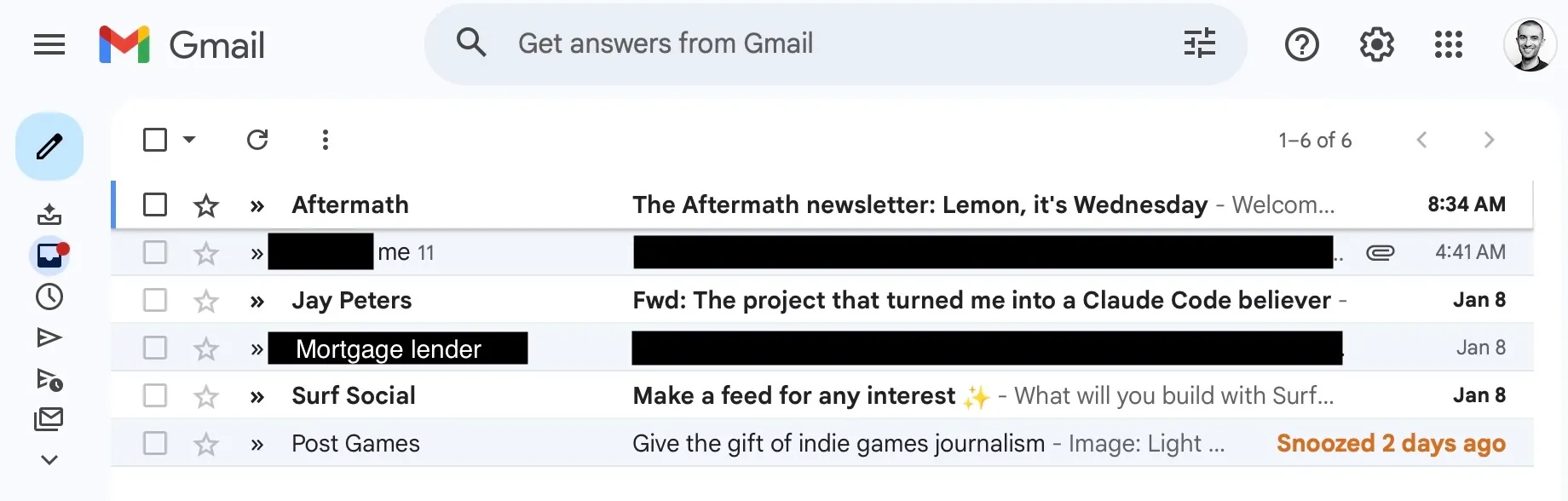
As I wrote this on Friday, there were six emails sitting in my personal inbox:
- A snoozed email from Chris Plante’s Post Games
- An email from Flipboard’s Surf app
- An email from my mortgage lender to review my annual escrow summary
- A recent Platformer newsletter I forwarded from my work email to my personal email
- A pitch from a friend sent to my personal email where I said I’d quick post something to noti.group
- And a newsletter from the gaming website Aftermath.
This, for me, is a high number; instead of deciding as soon as I can if I need to do something with the emails, I’ve let them sit to see how AI Inbox would handle them.
But if I click the new AI Inbox icon in my sidebar above the traditional inbox one, after a few seconds of loading, my inbox looks completely different.

Screenshot: Jay Peters / noti.group

Screenshot: Jay Peters / noti.group
With AI Inbox, my inbox instead becomes an AI-generated page of short summaries to read. There are suggested to-dos at the top, with links to the emails they’re about if I want to dig in more or respond. Under the to-dos, there are topics to catch up on, also with links to the relevant emails. Perhaps most notably, AI Inbox has pulled in two things that I’ve archived and aren’t in my main inbox: conversations between my wife and me about tax preparation and potty training for our toddler.
It’s all kind of like Google Search’s AI Mode, but for your Gmail. And similar to AI Mode, I don’t think AI Inbox is for me.
I have been actively using email since I was a teenager, so at this point I’ve spent decades honing my personal email management system. My philosophy is to keep my inbox neat, tidy, and compact; as soon as I can, I decide what I need to do with an email (read, reply, make a reminder against it, etc.) and then archive it.
AI Inbox, on the other hand, fills my screen with unnecessary information. I have to scroll down my 13-inch MacBook Air’s screen to see my full AI Inbox summary, but in my normal inbox, I have just six email threads to look at. The tool is also guessing, incorrectly, at what’s relevant to me right now; it doesn’t seem to factor in that I only keep things in my inbox that I need to figure out what to do with. Yes, while my wife and I do have to submit the tax engagement letter to our accountant, we don’t need to do it today, and we already have a plan for when we need to. Potty training planning also isn’t something that I need to catch up on because my wife and I are actively talking about it in real life.
That said, if you aren’t as ruthless as I am about keeping your email organized and your tasks in order, I can see how these nudges and suggestions from AI Inbox could be very useful. In an interview with noti.group, Blake Barnes, Google’s VP of product for Gmail, says that the company is seeing people treat AI Inbox as a complementary tool to their core inbox flow, and I think that’s the right way to look at it for now.
I should also reiterate that AI Inbox is a very early product that’s not widely available, and Google seems to have a lot of ideas on how to improve it. Barnes says the company is working on a way to mark one of the suggested items as completed. He says Google wants to add a quick-reply button to AI Inbox’s suggestions and potentially even suggest drafted replies for you. The company wants to integrate AI Inbox with Google Calendar so that suggested drafts could have preloaded suggested times if someone invites you to a meeting. He even described how users could eventually just tell AI Inbox to look out for emails from a certain person.
Should Google’s bigger ideas for AI Inbox come to fruition, you can see how Gmail could change from a constant deluge of things to firefight into an AI-supercharged personal assistant. Depending on how much you run your life through your email, that could be quite useful. But if that’s what AI Inbox turns into, you’re putting a lot of trust in Google’s AI to be able to handle that workload instead of figuring out your own system to manage your inbox exactly the way you want to.
Just as Google rapidly expanded AI Mode, I expect it will do the same with AI Inbox, and maybe it will become a tool in my arsenal down the line. I’ve also only been messing around with AI Inbox since Thursday night, so my opinion could change the longer I have it. But for now, I suspect I won’t be using AI Inbox much. Maybe I’m stuck in my ways, but my system works great for me, and I think it will hold up for years to come.
[Notigroup Newsroom in collaboration with other media outlets, with information from the following sources]