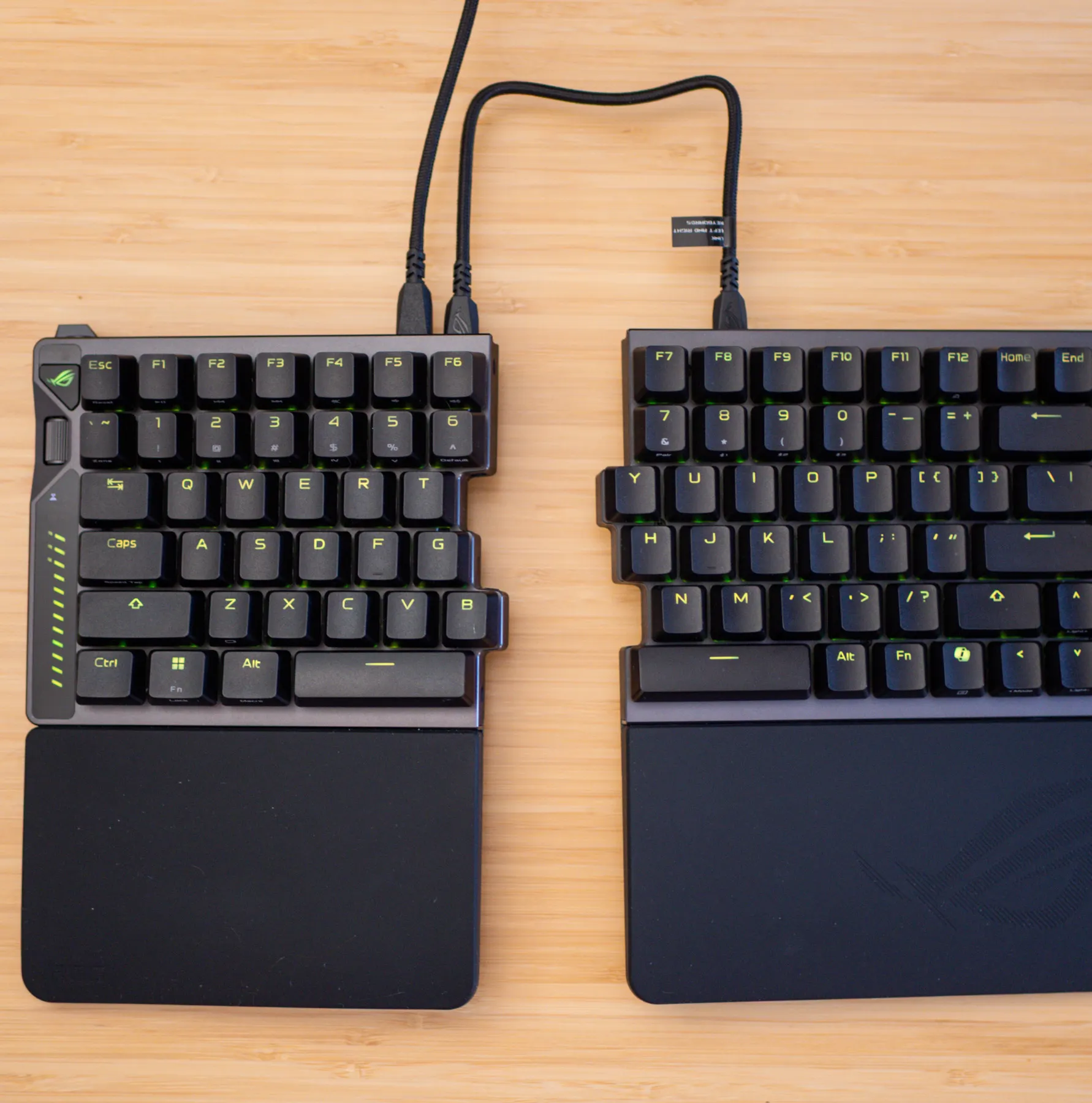
Hall effect gaming keyboards aren’t uncommon. But Asus’ ROG Falcata is the only one that’s also a split ergonomic keyboard, aimed at alleviating wrist, hand, or arm pain. For the luxury of having it all, you’ll pay $419.99, enough to buy a nice Hall effect keyboard and a split ergonomic one.
It’d be worth it if the Falcata truly represented the best of both worlds, but I’m split. As a Hall effect board, it succeeds, offering a wealth of customization options, including the ability to let you adjust each key’s actuation point by as little as a hundredth of a millimeter at a time. But if you’re buying it for ergonomics, like me, then maybe not. My biggest concern during testing was its limited tenting angles. $420 seems very steep for a keyboard that doesn’t… get very steep.

$420
The Good
- Compact
- Hall effect switches offer deep customization
- Rapid trigger and Speed Tap in a split ergo
- Browser-based customization
- Ultra-fast polling over wire or 2.4GHz
The Bad
- Tenting isn’t steep enough
- Included USB-C link cables too short
Tenting is an integral feature of split ergo keyboards. Being able to raise the inner sides of each of the two sections to your liking allows your arms and wrists to rest in a more neutral position than they would on a regular keyboard. The Falcata can only tent up to seven degrees (or six with the wrist rests installed). Some people may only need the slight tenting that the Falcata offers; I’m used to a 15-degree tent on my Kinesis Freestyle Edge RGB, while some prefer even higher.
You may not know what feels right until you use a tented keyboard, but at this price, Asus should have included more tenting options — and longer USB-C link cables, too. The halves can only be separated by a maximum of 10 inches, which doesn’t let me spread my arms as much as I need to feel relief (the Freestyle’s non-detachable cable can go up to 14 inches). Sure, I can use my own longer cable with the Falcata, but at $420, this is an oversight.
1/5
The Falcata’s insufficient tenting aside, it’s everything that my daily driver isn’t. It has the same 75-percent key layout (minus the Freestyle’s left-hand macro key columns), so there was no learning curve. Yet its design is both far more elegant and more compact on my desk. The halves can fit together like a standard keyboard, which is convenient if you need to travel with it. Also, it’s so quiet to type on (to be fair, most switches are quieter than Cherry MX Blues, my point of reference).
The Falcata is overflowing with gamer-oriented features. It gives you the option to turn on rapid trigger and Speed Tap (Asus’ branded name for simultaneous opposing cardinal directions, or SOCD), controversial features designed to give players the advantage in competitive games. Additionally, it can operate wired or via Bluetooth or 2.4GHz wireless (in wireless mode, its two halves are still linked together via USB-C), with up to an 8,000Hz polling rate available in all modes except Bluetooth.
The perks of its Hall effect switches, other than being quiet, is that they’re analog, not limited to the binary on/off states of digital sensors. You can customize the distance at which each key registers an input (and a reset), which for gamers can mean lightning-fast commands with almost no physical movement. They’re a bit trickier to use with typing, at least with default settings. I accidentally typed “fffffffffffffffffffffffff” or “jjjjjjjjjjjjjjjjjjj” in many text boxes just because my fingers were putting a little too much weight on the home keys. The Falcata offers multiple ways to adjust their sensitivity, and to customize a whole lot more. One route is to use Gear Link, Asus’ browser-based app. In my case, tweaking the dead zones for each key helped to eliminate misfires. You can even adjust these settings via the keyboard’s multipurpose scroll wheel. It’s meant to be faster, and to some it might be, but it felt more cumbersome than just using the web app.
1/4
Each of the Falcata’s keys can serve as a macro, if you want. While I’m more accustomed to the dedicated macro keys on my Kinesis, Gear Link makes it a breeze to assign additional functions to any key. In the app, you can assign simple functions to make life easier, like pushing a key also triggering a left mouse click. Since it’s a Hall effect board, there’s also Dynamic Keystroke, which lets you assign up to four unique commands depending on the key’s travel distance. For instance, you can program W (running forward in games) to just send W with a light press, and also trigger Shift and R with a full press, letting you sprint and reload any time you press it all the way. This level of customization is standard for Hall effect gaming keyboards, but this is the first time it’s available in a split ergonomic keyboard.
Coming back to rapid trigger and Speed Tap: They’re built to help you do things in games that are otherwise not possible, either due to the limitations of reflex speed or keyboard hardware. Rapid trigger, which is off by default and activated by flipping a switch near its multipurpose dial, allows key actuation to reset immediately upon release, even if you haven’t completed a full keystroke motion, readying the sensor to receive another input faster than the physical switches on your opponent’s keyboard might be able to.

Speed Tap (also off by default) lets you continue moving when two opposing cardinal directional keys (e.g., A and D) are pressed. For example, pressing A to move left and then pressing D to move right would normally make your character stop until you release one of them (reflecting reality — you can’t walk in two directions at once), but Speed Tap prioritizes your last input, overriding any other key that might still be pressed down. Valve considers the feature to be tantamount to an automatic assist, and therefore doesn’t allow its use in Counter-Strike 2. Still, it’s cool to have in games where you won’t risk getting banned.
For the Falcata to make sense, you have to really want both Hall effect and a split ergo keyboard. As an ergonomic board, it’s definitely a “try before you buy”; its limited tenting abilities could be fine, or you may realize right away that it’s not going to cut it. Unfortunately, you may not be able to try it until you buy it, as your local Best Buy may not have a model on display. If you decide to jump through that hoop, make sure you can get a refund if needed.
If you don’t mind missing out on the advanced features of a Hall effect board, the Kinesis Freestyle Edge RGB Plus is a great split ergo board that’s less than half the price. It offers hot-swap mechanical switches (it comes with either linear or tactile, but is compatible with thousands of different switch types), and with the Lift Kit that lets it tent at up to 15 degrees. Yes, it’s bulkier and wired only, with louder switches (depending on the ones you get), and it doesn’t have Hall effect switches. But it’s a very good keyboard, and it’s better ergonomically, too.
Photography by Cameron Faulkner / noti.group
[Notigroup Newsroom in collaboration with other media outlets, with information from the following sources]