Noti.Group RSS Feed
  • Contact Us
Wednesday, June 10, 2026
Noti Group Logo
  • Home
  • World News
  • Business
  • Health
  • Sports
  • Entertainment
No Result
View All Result
  • Home
  • World News
  • Business
  • Health
  • Sports
  • Entertainment
No Result
View All Result
Noti Group
No Result
View All Result
ADVERTISEMENT

Boox’s quirky page-turning remote won me over

in Technology
Reading Time: 28 mins read
407 4
A A
0
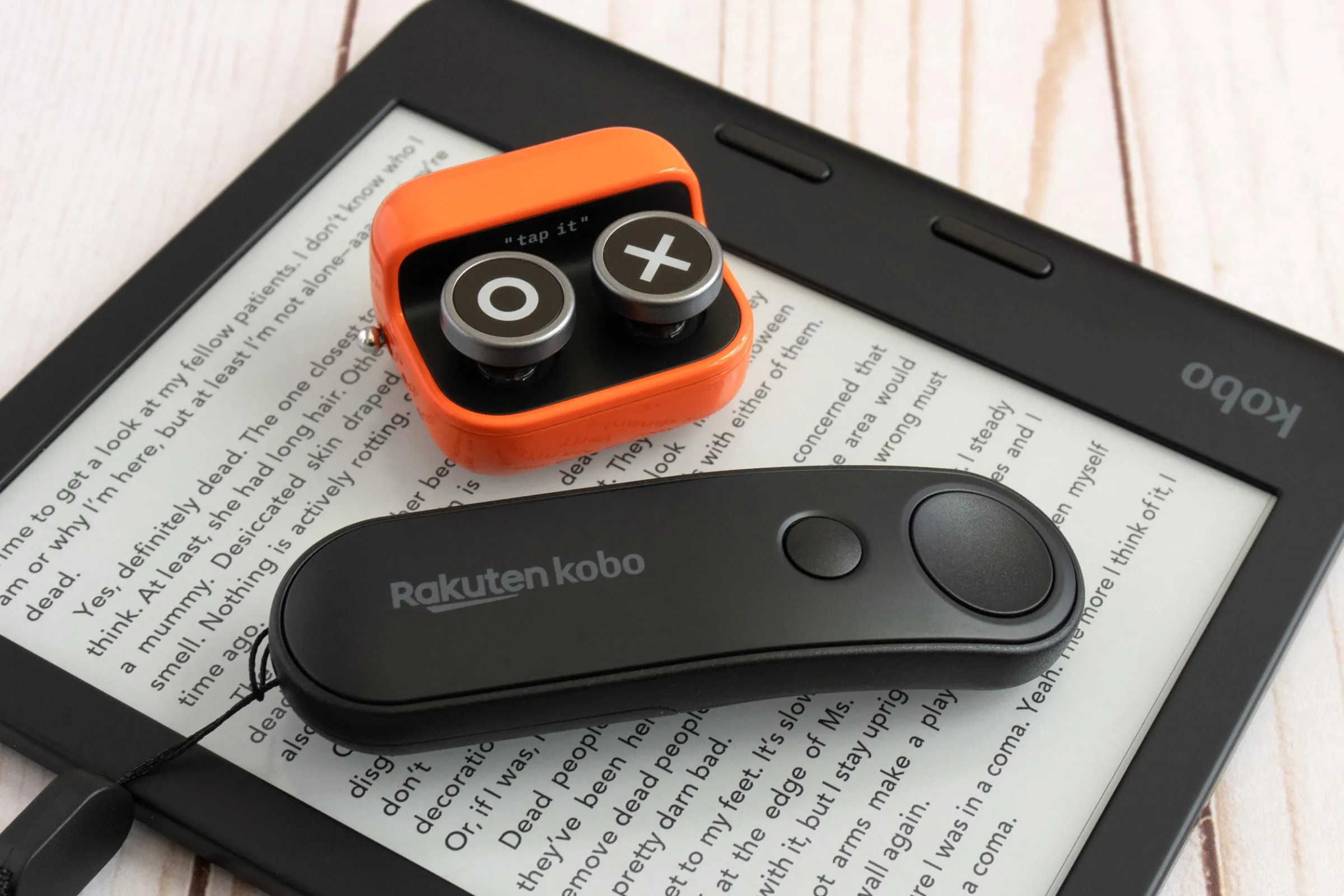
The Boox Tappy next to the Kobo Remote on a Kobo e-reader.
137
SHARES
6.8k
VIEWS
ShareShareShareShareShare

Following the launch of the surprisingly popular Kobo Remote, Boox has released its own device to ease the burden of reaching for an e-reader’s touchscreen that’s an arm’s length away. The Tappy isn’t Boox’s first page-turning remote, but its design takes a much different approach to the company’s slim but boring B.T. Remoter. The Tappy feels like a mashup of wireless remotes, fidget toys, and macro pads, with a healthy dash of retro charm.

The Tappy is much smaller than the Kobo Remote, but Kobo’s is more comfortable to hold.

While the Kobo Remote looks like a streaming dongle accessory with a design that prioritizes ergonomics, the Tappy can be best described as a miniature keyboard distilled to just two buttons that draws its design inspiration from a retro typewriter. It’s not as comfortable to hold as Kobo’s accessory, but it’s small enough to sit discreetly in your hand. There are also four rubber feet on its underside so it won’t slide around if used on a desk, and it’s available in two very glossy color options: olive green and a bright orange that I tested.

The Boox Tappy on an e-reader next to the included alternate button designs.

Four button designs are included with Tappy that can be easily swapped.

Tappy’s two round buttons don’t use actual keyboard switches but they have about a quarter-inch of travel and are satisfying to press when you’re in need of something to fidget with. Out of the box, the buttons are labeled with a pixelated heart and steaming mug of coffee, which I just don’t understand. I immediately switched to the included alternatives that are instead labeled with an X and an O, but more customizability, even if it was just a sheet of stickers I had to apply myself, would be preferred. Forward and back arrows, or even just a plus and minus, would be welcome alternatives to what’s included.

Tappy includes a sliding metal power switch that satisfyingly clicks into place.

Unlike the Kobo Remote that uses replaceable batteries, Tappy has a rechargeable one and a USB-C port for power.

Pairing the Tappy to a Boox device is easy, but don’t misplace the fold-out quick start guide that walks you through the process. After powering it on using a sliding metal switch on the side, you put the remote into pairing mode by holding down both buttons for about two seconds until a single LED on the side flashes blue. From there, you just need to connect to it through your Boox device’s Bluetooth settings. When you power it back on in the future, it reconnects automatically.

The buttons’ default functionality is Reading mode that turns pages forward and back or controls volume when outside a reading app, but the Tappy can be switched to two other modes. Multimedia mode changes the buttons’ functionality to skipping tracks in music, video, podcast, or audiobook apps, while Browsing mode lets you scroll up and down through long webpages or social media feeds for as long as you’re pressing either button.

When connected to a Boox device, the Tappy triggers a brief pop-up message when cycling through its various modes.

In addition to turning pages and controlling media playback, the Tappy can also be used to scroll websites and social media.

Pressing both buttons for about five seconds switches modes, which causes the LED to momentarily flash green. Repeating that process cycles through Reading, Multimedia, and Browsing modes, and every time you switch, a notification pops up at the top of your Boox device letting you know the current mode. But it’s not persistent and can be easily missed. A trio of labeled LEDs indicating the Tappy’s current mode or even having the single LED display a different color for each one would make it easier to know what mode it was in at a glance, especially when using the remote with other devices.

While Tappy works best with Boox e-readers and tablets running the company’s V4.2 firmware or later (which includes recent hardware like the Boox Palma 2 Pro), it can also be used with other Android mobile devices, and iPhones and iPads, with varying levels of functionality. The functionality is supported in both the Kobo and Kindle Android apps, but not in the iOS or iPadOS versions. However, I was able to use the Tappy on my iPhone and OnePlus phone to scroll webpages, control music playback, and adjust the volume.

A person holding and pressing a button on the Boox Tappy with an e-reader in the background.

Tappy’s design doesn’t prioritize ergonomics, but its rounded corners still make it comfortable to hold.

The bigger challenge when using the Tappy with non-Boox hardware is you don’t get the useful pop-up notifications letting you know which mode you’ve just switched to. And without any LED indicators, the only way to know what mode Tappy is in is to just press the buttons and see what happens. Did the volume go up and down? Great, you’re in Reading mode and are just two switches away from the Browsing mode you want.

Other e-readers from companies like Pocketboot or BigMe are supported, according to Good e-Reader’s testing, but I had no luck getting the Tappy to work with the Kobo and the Kindle. That’s unfortunate because while I still regularly enjoy using the Kobo Remote for reading at night, I would happily abandon it for the Tappy. The tiny remote has already replaced my Apple Watch for skipping tracks when streaming my iPhone through my HomePod, even if its buttons occasionally get accidentally pressed when it’s bouncing around my pocket. At $29.99 it’s the same price as the Kobo Remote, but its buttons are more satisfying to use and it’s more than just a one-device accessory.

Photography by Andrew Liszewski / noti.group

Follow topics and authors from this story to see more like this in your personalized homepage feed and to receive email updates.

  • Andrew Liszewski

    Andrew Liszewski

    Andrew Liszewski

    Posts from this author will be added to your daily email digest and your homepage feed.

    See All by Andrew Liszewski

  • Deals

    Posts from this topic will be added to your daily email digest and your homepage feed.

    See All Deals

  • Gadgets

    Posts from this topic will be added to your daily email digest and your homepage feed.

    See All Gadgets

  • Hands-on

    Posts from this topic will be added to your daily email digest and your homepage feed.

    See All Hands-on

  • Reviews

    Posts from this topic will be added to your daily email digest and your homepage feed.

    See All Reviews

  • Tech

    Posts from this topic will be added to your daily email digest and your homepage feed.

    See All Tech

  • Verge Shopping

    Posts from this topic will be added to your daily email digest and your homepage feed.

    See All Verge Shopping

[Notigroup Newsroom in collaboration with other media outlets, with information from the following sources]


Tags: dealsgadgetsHands-onreviewsTechVerge Shopping
Previous Post

Reds fan has strange defense for dangling child over wall

Next Post

Spurs-Knicks NBA Finals ticket prices for MSG continue free fall

Related Posts

Microsoft, like, totally gets why students are booing AI-pilled graduation speakers
Technology

Microsoft, like, totally gets why students are booing AI-pilled graduation speakers

June 10, 2026
Amazon’s Echo speakers can now help kids wind down and fall asleep
Technology

Amazon’s Echo speakers can now help kids wind down and fall asleep

June 10, 2026
A digital billboard showing Spencer Pratt and Karen Bass with their Polymarket odds for "Who will be the next mayor?".
Business

Regulators move to allow most sports betting, bar war wagers on prediction platforms like Kalshi, Polymarket

June 10, 2026
Google Search now lets you ask AI Overviews follow-up questions
Technology

Google will save your Lens photos, Search Live recordings, and Translate audio for AI training

June 10, 2026
Load More
Next Post
Spurs-Knicks NBA Finals ticket prices for MSG continue free fall

Spurs-Knicks NBA Finals ticket prices for MSG continue free fall

Leave a Reply Cancel reply

Your email address will not be published. Required fields are marked *

No Result
View All Result

Recent Posts

  • Microsoft, like, totally gets why students are booing AI-pilled graduation speakers
  • Kalshi promo code NYPMAX: Trade $10, get $10 for Stanley Cup Final winner markets
  • Chris Russo slams Victor Wembanyama for ‘dirty’ Jalen Brunson shove
  • The future of AI regulation is courting the strangest, most anxious bedfellows
  • Panthers coach Dave Canales has skin cancer removed from nose

Recent Comments

  • Stefano on The Last Byzantine Medieval Town on Earth Is Being Destroyed, and It’s Too Late
  • Van Hens on The Last Byzantine Medieval Town on Earth Is Being Destroyed, and It’s Too Late
  • Ioannis K on The Last Byzantine Medieval Town on Earth Is Being Destroyed, and It’s Too Late
  • Panagiotis Nikolaos on The Last Byzantine Medieval Town on Earth Is Being Destroyed, and It’s Too Late
  • John Miele on UK government suggests deleting files to save water

Noti Group All rights reserved

No Result
View All Result
Noti Group

What’s New Here

  • Microsoft, like, totally gets why students are booing AI-pilled graduation speakers
  • Kalshi promo code NYPMAX: Trade $10, get $10 for Stanley Cup Final winner markets
  • Chris Russo slams Victor Wembanyama for ‘dirty’ Jalen Brunson shove

Topics to Cover!

  • Business (5,031)
  • Entertainment (2,071)
  • General News (326)
  • Health (327)
  • Investigative Journalism (12)
  • Lifestyle (4)
  • Sports (11,639)
  • Technology (7,360)
  • World News (1,336)
  • Contact Us
  • Terms and Conditions
  • Privacy Policy
  • RSS
  • Contact News Room
  • Code of Conduct
  • Careers
  • Values
  • Advertise
  • DMCA

© 2025 - noti.group - All rights reserved - noti.group runs on 100% green energy.

Welcome Back!

Login to your account below

Forgotten Password?

Retrieve your password

Please enter your username or email address to reset your password.

Log In
No Result
View All Result
  • Home
  • World News
  • Business
  • Health
  • Sports
  • Entertainment

© 2025 - noti.group - All rights reserved - noti.group runs on 100% green energy.