I’ve been testing out Gemini’s new task automation on the Pixel 10 Pro and the Galaxy S26 Ultra, which for the first time lets Gemini take the wheel and use apps for you. It’s limited to a small subset right now — a handful of food delivery and rideshare services — and it’s still in beta. It’s slow, it’s clunky at times, and it doesn’t solve any serious problem you had using your phone. But it’s impressive as hell, and I don’t think it’s hyperbole to say this is a glimpse of the future. We’re still a long way off, but this is the first time I’ve seen a true AI assistant actually working on a phone — not in a keynote presentation or a carefully controlled demo inside a convention hall.
First off: Gemini is much slower than you, or me, or most anyone at using their phone. If you need to order an Uber right this second, you’re still the best person for the job. Before you write it off, though, remember that task automation is designed to run in the background while you do other things on your phone. Even better, it keeps working while you’re not looking at your phone, so you can do things like check that your passport is in your bag for the 10th time.
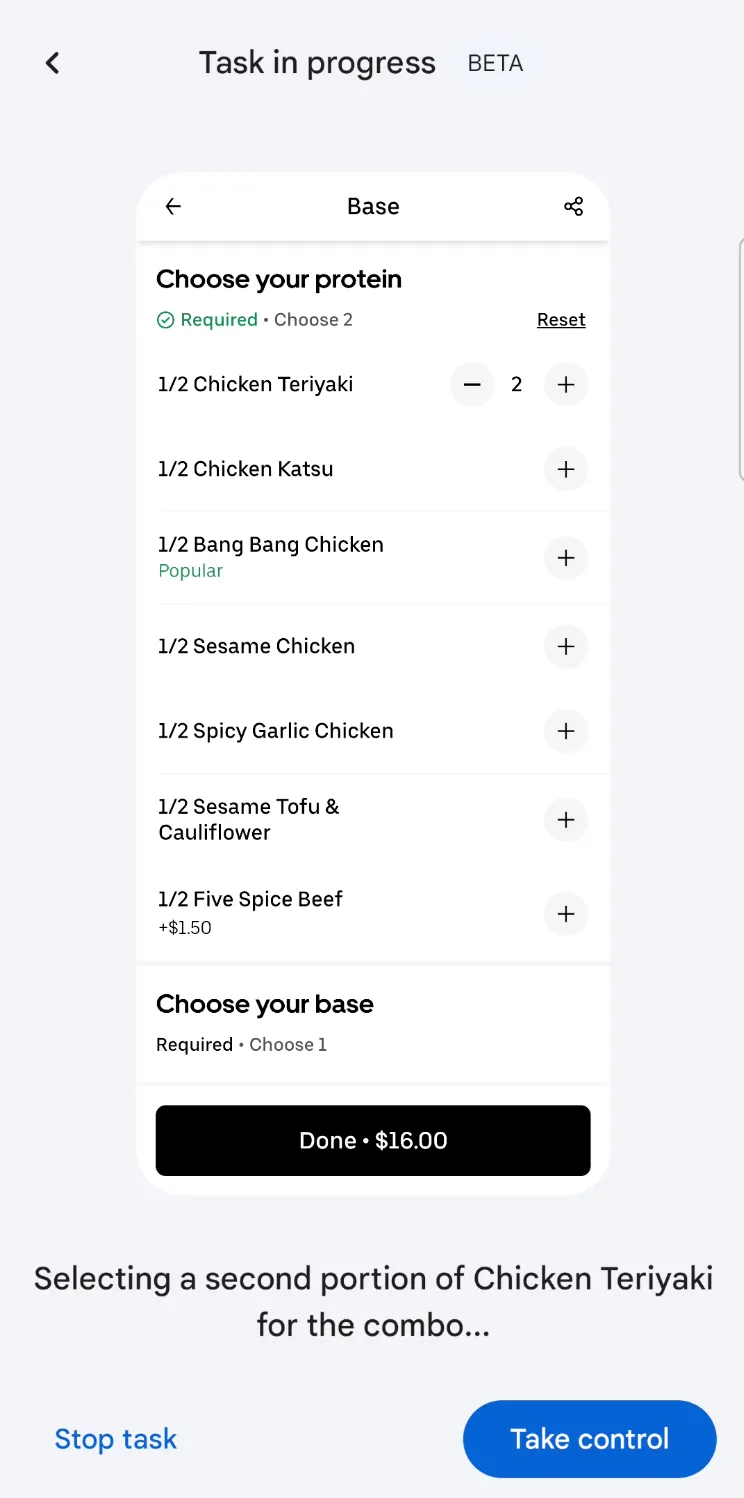
But if you’re curious, like I am, you can watch the whole thing happen. While it’s working, text appears at the bottom of the screen indicating what Gemini is doing. Stuff like “Selecting a second portion of Chicken Teriyaki for the combo,” which it did when I directed it to order my dinner on Saturday night. Watching Gemini figure things out on the fly honestly kinda rules. I asked for a chicken combo plate; the menu presented options in half- portion increments, so it correctly added two half servings of chicken.

It’s for the best that when you start an automation with Gemini, the default behavior is for it to run in the background. You have to tap a button and open another window if you want to watch Gemini working through the task. And it can be excruciating. Watching the computer try to find a side of greens on a menu in Uber Eats when it’s sitting right there at the top of the screen is like watching a horror movie and knowing the murderer is in the closet right next to the protagonist. I mean, except for the murder part. Gemini made a couple of wrong turns as it put together my teriyaki order, which it eventually figured out on its own, but the whole episode took about nine minutes. Not ideal.
Gemini is supposed to carry out your task right up to the point where it’s time to hit confirm and order your car or dinner so you can double-check its work. This, I think, is the only sane way to use this feature right now, and I don’t mind the added friction of completing the order. In the tests I’ve run over the past five days, I’ve never had it go rogue and finish my order for me. And it is surprisingly accurate; I’ve had to make very few adjustments to the final order. If it fails — which I have seen happen a couple of times — it tends to be within the first minute or two when something about the app needs my attention, like giving it permission to use my location, or changing the delivery location to home rather than Nevada, which was the last place I used that app. I had to figure out what the problem was in cases like this, but once it was sorted out I was able to restart the automation without an issue.
Here’s the one that really got me. I put an event on my calendar for a flight to San Francisco the following day (a pretend trip for me, but real flight details). I gave Gemini a vague prompt to schedule an Uber that would get me to the airport in time for my flight tomorrow. Because Gemini has access to my email and calendar, it can go find that information. It did need a little extra guidance — possibly because the flight wasn’t in my email like it expected. But with that, it found the flight information, suggested leaving by 11:30 or 11:45AM (logical timing for a 1:45PM flight given I live close to the airport), and asked if I wanted to schedule a ride for one of those times. I confirmed the time, and it went about setting up the ride in about three minutes with no further input required on my part.


It’s a little more impressive when you consider that Uber doesn’t even refer to it as scheduling a ride — you reserve a ride. That’s the key difference between the digital assistants we’ve been using and the AI assistants emerging now. Being able to use natural language when talking to the computer makes a huge difference when you’re controlling your smart home or placing your dinner order. If the computer is going to get tripped up and ask for clarification when you forget that the restaurant calls your meal a “plate” and not a “combo,” or if you ask for “slaw” instead of “shredded cabbage,” then it’s no more useful than the assistants we’ve been using for the past decade to set timers and play music.
That said, watching Gemini tap and scroll around Uber Eats makes one thing painfully obvious: If you were designing an application for AI to use, it would look nothing like the ones we have today. You know, apps designed for humans. An AI assistant won’t be tempted by a big ad in the middle of a page to save 30 percent on your order. An appetizing, well-staged photo of the dish it’s ordering isn’t any more convincing than a low-quality one. You would give it a database, not a bunch of clutter to weed through — something the industry is working toward in Model Context Protocol, or MCP.
An AI model reasoning its way through a human-centric interface feels like the most impractical and brittle way to place a pizza order. It does hit a snag occasionally, and it’s not great at telling you why it couldn’t do something. This version of task automation feels like a stopgap until app developers adopt more robust methods: MCP or Android’s app functions. Google’s head of Android, Sameer Samat, told me recently that Gemini takes the reasoning approach in the absence of the other two. Maybe this version of task automation is our preview of what’s possible, or a way to prod developers into adopting one of the other methods. Either way, this feels like a notable first step toward a new way of using our mobile assistants — awkward, slow, but very promising.
Photography by Allison Johnson / noti.group
[Notigroup Newsroom in collaboration with other media outlets, with information from the following sources]