Noti.Group RSS Feed
  • Contact Us
Tuesday, March 17, 2026
Noti Group Logo
  • Home
  • World News
  • Business
  • Health
  • Sports
  • Entertainment
No Result
View All Result
  • Home
  • World News
  • Business
  • Health
  • Sports
  • Entertainment
No Result
View All Result
Noti Group
No Result
View All Result
ADVERTISEMENT

Remember Google Stadia? Steam finally made its gamepad worth rescuing

in Technology
Reading Time: 3 mins read
403 8
A A
0
Remember Google Stadia? Steam finally made its gamepad worth rescuing
137
SHARES
6.9k
VIEWS
ShareShareShareShareShare

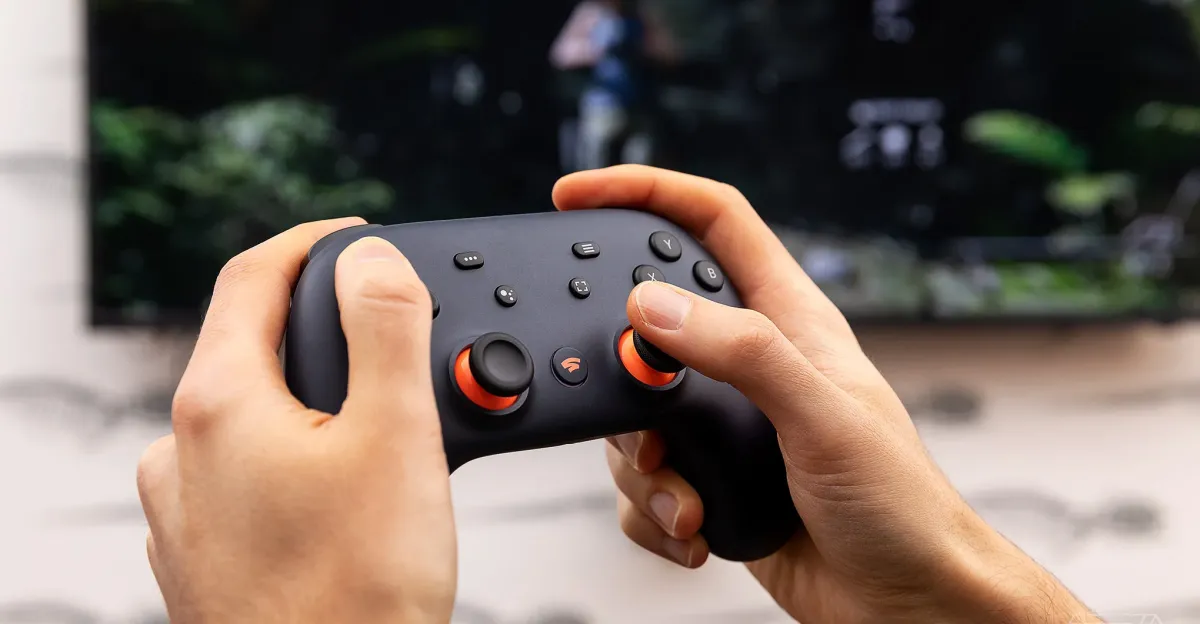
December 31st, 2025 is the deadline to save the Google Stadia controller. That’s less than three weeks from today — but there’s never been a better time. Last month, I discovered the controller is finally a first-class citizen in Steam and SteamOS.

The Stadia controller was originally designed to connect to your Wi-Fi network and remotely control games from Google’s cloud servers. But when Stadia shut down in January 2023, the company did an amazing job shutting down the service: it offered full hardware refunds and let you rescue the Stadia Controller by turning it into a generic Bluetooth gamepad instead.

When I flew to Valve headquarters in late October to see the Steam Machine, I asked Pierre-Loup Griffais if Steam would ever fully support the Stadia controller the way it’s supported so many other gamepads, letting you turn each of its buttons and joysticks into fully customizable control schemes. At the time, he said he thought the Xbox One wireless adapter might be a higher priority than Google’s abandoned controller.

So you can imagine my surprise to find Steam not only supports the Stadia gamepad now, it’s made every button useful. That Google Assistant key is now a freely programmable M1 macro button! Google’s screenshot button takes screenshots in SteamOS! The Stadia button is now effectively an Xbox button, letting you activate many (not all) of the Steam Deck’s handiest shortcuts, including Stadia+A to pull up the quick access menu, Stadia+Right Stick to summon a mouse cursor, and Stadia+Left Stick to adjust the volume or brightness.

On a desktop, the Stadia button can additionally launch Steam’s Big Picture Mode.

It’s certainly not the best gamepad you can buy for Steam. (This one’s currently my fav.) The Stadia Controller never offered gyro or back buttons, and while I see an “Allow this device to wake Steam Deck” option in the SteamOS Bluetooth menu, it doesn’t seem to work properly. The controller also doesn’t automatically shut off when I put the Deck to sleep — I have to hold down the power button every time.

Also, don’t expect to plug headphones into the pad’s 3.5mm jack — as Google warned years ago when Stadia shut down, that pass-through audio feature isn’t designed to work in Google’s replacement Bluetooth LE mode.

But if you picked up a Stadia Controller years ago, perhaps even for free, it’s a great secondary gamepad that might even be a good primary device for certain games. It’s got a tight, clicky, and very directional D-pad, smooth sticks and triggers, and responsive face buttons.

And through December 31st, saving this gamepad is exceptionally easy. You just plug it into a desktop computer, open a browser to Google’s official page, and follow a few minutes worth of instructions. Here’s our how-to if you want to see what’s involved first. Afterwards, you just hold Stadia+Y to put it in pairing mode, though it can’t remember pairings for more than one device at a time.

It’s possible that Google will grant another last-minute reprieve and extend the deadline another year, but I wouldn’t bet on it. I’ve been asking Google PR for over two weeks, but the company hasn’t offered an answer.

If you know a friend with this gamepad, or see one at your local thrift store for cheap, perhaps it’s time to save it!

[Notigroup Newsroom in collaboration with other media outlets, with information from the following sources]


Tags: gamingHands-onPC GamingreviewsTech
Previous Post

Exclusive | ‘Survivor 49’s Steven Ramm calls out Sage, Kristina for betrayal

Next Post

Rosalia Lux Tour 2026: Where to buy tickets, schedule, dates

Related Posts

Remedy’s live-service shooter Firebreak is getting its final major update
Technology

Remedy’s live-service shooter Firebreak is getting its final major update

March 17, 2026
Now everyone in the US is getting Google’s personalized Gemini AI
Technology

Now everyone in the US is getting Google’s personalized Gemini AI

March 17, 2026
Nvidia’s DLSS 5 is like motion smoothing for video games, but worse
Technology

Nvidia’s DLSS 5 is like motion smoothing for video games, but worse

March 17, 2026
Antigravity’s 360-degree A1 drone is 15 percent off
Technology

Antigravity’s 360-degree drone is 20 percent off ahead of its next update

March 17, 2026
Load More
Next Post
Rosalia Lux Tour 2026: Where to buy tickets, schedule, dates

Rosalia Lux Tour 2026: Where to buy tickets, schedule, dates

No Result
View All Result

Recent Posts

  • How to watch USA-Venezuela in WBC 2026 Final: Time, livestream
  • Chris Rock takes sweaty stroll on LA beach as heat wave descends on SoCal
  • Spotify adds ‘Exclusive Mode’ audiophile feature for Windows PCs
  • Matt Vasgersian takes blame for Mark DeRosa’s WBC controversy
  • NFL season is starting on Wednesday in new quirk

Recent Comments

  • Stefano on The Last Byzantine Medieval Town on Earth Is Being Destroyed, and It’s Too Late
  • Van Hens on The Last Byzantine Medieval Town on Earth Is Being Destroyed, and It’s Too Late
  • Ioannis K on The Last Byzantine Medieval Town on Earth Is Being Destroyed, and It’s Too Late
  • Panagiotis Nikolaos on The Last Byzantine Medieval Town on Earth Is Being Destroyed, and It’s Too Late
  • John Miele on UK government suggests deleting files to save water

Noti Group All rights reserved

No Result
View All Result
Noti Group

What’s New Here

  • How to watch USA-Venezuela in WBC 2026 Final: Time, livestream
  • Chris Rock takes sweaty stroll on LA beach as heat wave descends on SoCal
  • Spotify adds ‘Exclusive Mode’ audiophile feature for Windows PCs

Topics to Cover!

  • Business (4,751)
  • Entertainment (1,866)
  • General News (326)
  • Health (327)
  • Investigative Journalism (11)
  • Lifestyle (4)
  • Sports (8,193)
  • Technology (6,095)
  • World News (1,336)
  • Contact Us
  • Terms and Conditions
  • Privacy Policy
  • RSS
  • Contact News Room
  • Code of Conduct
  • Careers
  • Values
  • Advertise
  • DMCA

© 2025 - noti.group - All rights reserved - noti.group runs on 100% green energy.

Welcome Back!

Login to your account below

Forgotten Password?

Retrieve your password

Please enter your username or email address to reset your password.

Log In
No Result
View All Result
  • Home
  • World News
  • Business
  • Health
  • Sports
  • Entertainment

© 2025 - noti.group - All rights reserved - noti.group runs on 100% green energy.