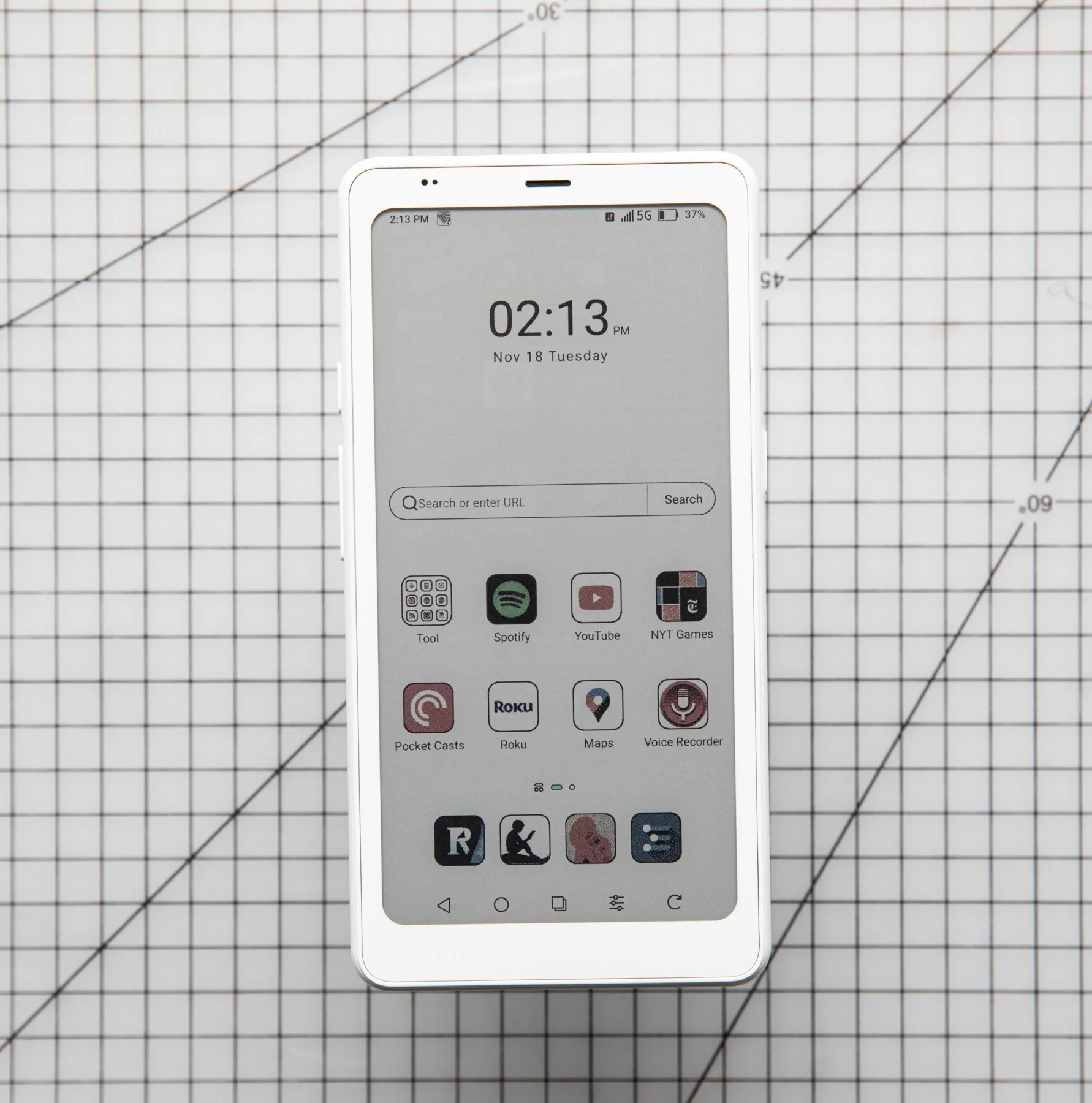
Year after year, model after model, the Boox Palma gets a little closer to the device of my dreams. Onyx, the company that makes it, found a formula that remains both simple and delightful: it’s a gadget about the size of a smartphone, with access to the full breadth of Android apps, but with an E Ink screen that gives the Palma a much more focused existence.
My Palma is almost entirely for four things: reading (via Kindle and Readwise), listening (via Pocket Casts and Spotify), taking notes (via MyMind and Workflowy), and controlling my Roku TV. The Palma can do many things, but it does only a few things well. And the battery life is great.
On paper, the new Palma 2 Pro is the first to tick all the boxes. The new $399.99 device is the most expensive Palma yet, but also easily the most high-tech. Most significantly, it has a SIM card slot for adding (data-only) cell connectivity. It also has a color screen, a newer version of Android, more RAM, stylus support, and a bunch of new software features. This could be the do-everything minimalist device we’ve been waiting for.
After testing the device for a while, I’m sorry to report: it’s not. The idea remains a good one, and the SIM slot and pen support have both made the Palma useful in new ways. But one of this device’s “upgrades” is actually such a huge downgrade that I almost immediately found myself using the Palma 2 Pro less than either of its predecessors. It’s such a glaring problem that I can’t recommend buying this device at all; buy the Palma 2 instead. Or just wait a little longer, and hope that Onyx figures out how to give us all the right features at the same time.

$400
The Good
- Cell connectivity!
- Great battery life
- Pen support works well
The Bad
- The screen is flat-out bad
- Feels pretty cheap
- Decidedly not cheap
Let’s just do this first: the problem is the screen. The Palma 2 Pro has a 6.13-inch, color screen, based on E Ink’s Kaleido 3 technology. The Kaleido 3 tech is a few years old, and it’s essentially a color filter layered over a standard black-and-white E Ink screen.
You can find Kaleido 3 screens in lots of gadgets, none of which look amazing, but many of which look fine. The tech comes with a few inherent drawbacks, most notably its resolution — 150ppi is only half as sharp as a modern black-and-white E Ink screen — and its brightness. Amazon’s Kindle Colorsoft is based on Kaleido 3, just to name one example, but Amazon rebuilt the whole display stack to make it sharper, brighter, and more accurate. Amazon was very clear that it didn’t believe Kaleido was good enough on its own.
Amazon was right. The Palma 2 Pro’s screen is a mess. It’s so dim that I have to turn the device’s light up much higher than on previous models just to see text on the screen. The lower pixel density makes any small text essentially unreadable, and it still feels vaguely out of focus even when I’m just reading text on a blank background. I’ve spent what feels like hours fiddling with the Palma’s (many, many, way too many) display settings, and still can’t get it to the point I like looking at it.

And for what? Sure, the Palma 2 Pro renders things in color, but those things look like impressionist paintings rather than sharp photos. It supposedly supports 4,096 colors, but in practice turns most things into some weird brand of rust red. The screen is relatively fast, which makes it fun to pan and zoom around the pages of comic books, but the ghosting effect is pretty rough and everything just looks fuzzy. In all my testing, there hasn’t been a single time I’ve been glad to have this color screen instead of the sharper, brighter, more pleasant black-and-white panel on the Palma 2.
It’s a shame the screen is such a deal-breaker, too, because the SIM slot is the best thing that ever happened to the Boox Palma. I bought a $20 prepaid data-only SIM card, popped it into the slot at the bottom of the device, and never thought about connectivity again. Since you’re not likely to use this device for a lot of video streaming, a little data goes a long way, and having my reading lists and podcast queues automatically up-to-date has solved one of my few issues with living the Palma life.
I use the Palma as sort of a combination iPod / Kindle, but adding cell connectivity means you can use the Palma 2 Pro as a phone. It’s a surprisingly decent one: the microphone sounds pretty good, though it’s not great at cancelling background noise, and the speaker is not great but certainly good enough.
The Palma may not be a phone for making phone calls (though some enterprising users seem to be proving otherwise), but you can easily use the calling features of just about any messaging app. I’m not sure I’d recommend this or any E Ink phone as an iPhone or Pixel replacement, but the Palma 2 is a great backup phone or weekend device. And maybe, since it’s all that and a Kindle replacement, the $400 price is a little easier to stomach. Maybe.

So there’s the worst thing about the Palma 2 Pro, and the best thing about it. Everything else is pretty much par for the Palma course. It still feels a little plasticky and fragile. It still benchmarks like a midrange phone from four years ago, and while the numbers are slightly higher than the Palma 2, I don’t really notice the difference. The camera is still more for scanning QR codes than for making memories. The battery still lasts the better part of a week.
Everything else is pretty much par for the Palma course
There are a couple of smaller but still nice upgrades. It has 8GB of RAM and runs Android 15, both of which are great signs for the overall longevity of the device. (I’ve always worried about how long a Palma will be useful, given the typical combination of old chip and old software.) The Palma 2 Pro also supports Onyx’s $46 InkSense stylus, which writes fairly smoothly and can be used for everything from notes to actually writing your texts longhand if that’s your thing for some reason. It’s not the best stylus experience I’ve ever had, but it works.
Other than the mass of customization options, Boox offers its typical set of built-in apps for reading, file-sharing, and a few other things. You can safely ignore most or all of them, as I do. The AI Assistant app is a little more pushy and hard to ignore, and does threaten the Palma’s whole non-chaotic existence. With a little work, though, you can still turn it all off and get back to the things you want to do.
Ultimately, the Palma — like most of Onyx’s many, many other Boox devices — is exactly the sum of all these parts. The company doesn’t do a lot of in-house parts development or offer big new ideas about software. It is instead constantly remixing parts and spec sheets to try and find the right mix for the right device. The Palma combination (smartphone, E Ink, Play Store) remains an excellent one. A data connection makes all three parts better. A color screen might, too. But not this one. This one sent me right back to the Palma 2. It’s black and white, and it only works on Wi-Fi, but at least it’s nice to look at.
[Notigroup Newsroom in collaboration with other media outlets, with information from the following sources]